A song is playing. The user has put the app in the background. Then the server reports that their subscription has expired.
Removing the Premium label from the account screen is easy. The playback service also needs to know. Subsequent playback should follow the Free plan’s advertising rules, with audio quality set to Medium. When the user opens the player again, it should show the same subscription status.
In this example app, the current song finishes uninterrupted. Advertising and quality changes take effect when preparing the next track. An ad does not have to play before every song; the ad scheduler decides the frequency. These are our product rules, not a claim about the exact behavior of any particular music service.
This gives us a concrete way to look at Google’s AppState libraries: where should shared application state live, and how do we derive decisions from it?
What AppState adds
AppState has two main libraries. StateStore holds shared Compose state behind type-safe keys. Transform runs a composable calculation without rendering UI and exposes its result as State<T>. You can use either independently. AppState guide.
AppState is an alternative you can evaluate within your existing Android architecture. It does not require removing ViewModels or converting working Flow pipelines. You can try Compose’s state model outside the UI in one feature while keeping your existing approach elsewhere.
As of October 30, 2026, both are at 1.0.0-alpha01. The first alpha shipped on October 28; APIs may change. Transform releases, StateStore releases.
How we would build this today
A shared repository can expose the subscription as a StateFlow. The player and account ViewModels observe it. The playback service uses the same source. Each screen does not need to maintain its own independent subscription copy.
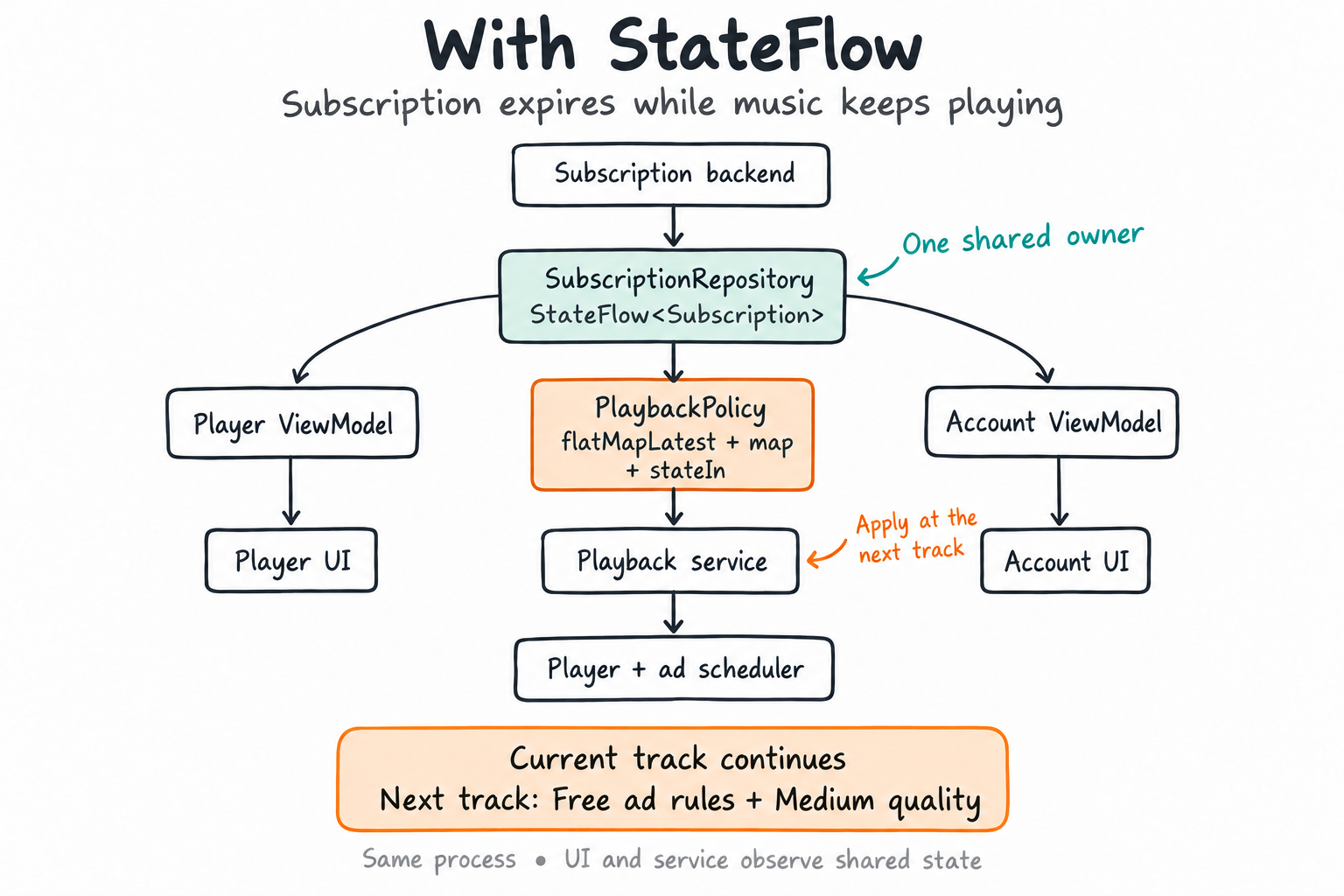
The drawing focuses on subscription sharing. The code below also includes the user’s preferred audio quality.
Premium users can choose Medium or High. Free users get Medium. We use UNKNOWN until the subscription is verified, rather than silently treating an unresolved subscription as Free. A null playback policy means the decision is not ready yet.
@Serializableenum class Subscription { UNKNOWN, FREE, PREMIUM }
enum class AudioQuality { MEDIUM, HIGH }
data class PlaybackPolicy(    val adsEnabled: Boolean,    val quality: AudioQuality,)
With Flow, we can select the source to observe based on the subscription:
@OptIn(ExperimentalCoroutinesApi::class)fun flowPlaybackPolicy( subscription: StateFlow<Subscription>, preferredQuality: Flow<AudioQuality>, scope: CoroutineScope,): StateFlow<PlaybackPolicy?> = subscription .flatMapLatest<Subscription, PlaybackPolicy?> { plan -> when (plan) { Subscription.UNKNOWN -> flowOf(null) Subscription.FREE -> flowOf( PlaybackPolicy(adsEnabled = true, quality = AudioQuality.MEDIUM) ) Subscription.PREMIUM -> preferredQuality .map<AudioQuality, PlaybackPolicy?> { quality -> PlaybackPolicy(adsEnabled = false, quality = quality) } .onStart { emit(null) } } } .stateIn(scope, SharingStarted.Eagerly, null)The Premium branch observes the quality preference. Switching to Free makes flatMapLatest cancel that collection and emit the fixed Free policy. Eagerly is deliberate: the service’s policy should not depend on a screen being subscribed. Work stops when the supplied scope ends. flatMapLatest, stateIn.
This solution meets the needs of our example. When comparing it with AppState, the useful question is which approach makes the same behavior easier to read and maintain.
Would a SharedViewModel be enough?
Screens within the same activity or navigation graph can observe a subscription through a SharedViewModel. Sharing a ViewModel between an Activity and a Service in the same process is also technically possible: both can use a common ViewModelStoreOwner and request the same ViewModel with the same key. You then own that store’s lifetime and cleanup. Passing an Activity-owned ViewModel reference to a service does not extend its lifetime. Custom ViewModel scopes, owner contract.
For this example, I would keep the service independent of an Activity-owned ViewModel. Playback may continue after the screens are gone.
We need a state owner independent of a screen. In the existing design, that can be a repository. In an AppState design, it can be a manager. ViewModel still owns screen state and user interactions. AppState does not replace ViewModel. ViewModel ownership and scope.
Sharing the subscription with StateStore
For UI and service components in the same process, we create a shared StateStore through DI. SubscriptionManager keeps its key private and exposes read-only state. The layer receiving verified subscription updates owns writes.
@Serializableprivate data object SubscriptionKey :    StateStoreKey<Subscription>(Subscription.UNKNOWN)
class SubscriptionManager(private val store: StateStore) {    val subscription: State<Subscription> =        store.getState(SubscriptionKey)
    internal fun onVerifiedSubscriptionChanged(value: Subscription) {        store.setState(SubscriptionKey, value)    }}
This method does not detect expiration by itself. Our subscription synchronization component fetches the current entitlement from the backend and passes the verified result to the manager. A refresh or an app-specific update notification can trigger that fetch. AppState supplies neither the network transport nor the billing integration.
Here, PREMIUM means the user still has Premium access. Turning off renewal does not necessarily remove that access immediately. For Play subscriptions, cancellation can leave access until the billing period ends, and grace periods need separate handling. Our backend resolves those billing states into the app’s entitlement; the client enum deliberately does not model the entire billing lifecycle. Subscription lifecycle.
We do not create a new manager and store for every ViewModel. Sharing those instances is the DI setup’s responsibility; StateStore is not automatically a singleton. A service running in another process cannot share this memory and needs IPC. StateStore scope.
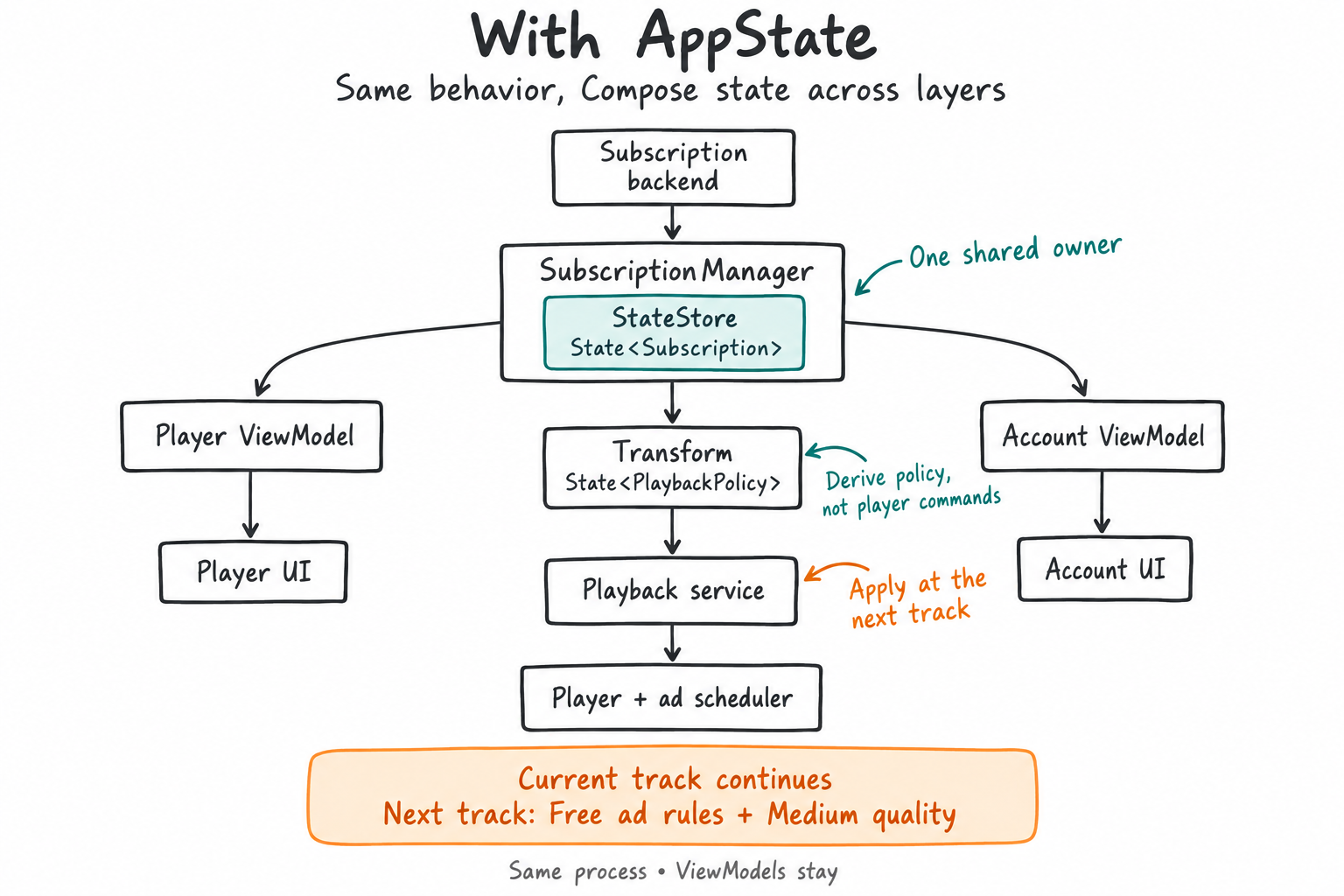
StateStore holds the subscription. Transform derives playback policy. The service applies it. Additional inputs, such as the quality preference, are omitted from the drawing for clarity.
What Transform does here
We can derive the same playback policy using Compose state. The quality preference can remain a Flow from our existing DataStore or repository:
fun composePlaybackPolicy( subscriptions: SubscriptionManager, preferredQuality: Flow<AudioQuality>, scope: CoroutineScope,): State<PlaybackPolicy?> = transform<PlaybackPolicy?>( initialValue = null, scope = scope,) { when (subscriptions.subscription.value) { Subscription.UNKNOWN -> null Subscription.FREE -> PlaybackPolicy(adsEnabled = true, quality = AudioQuality.MEDIUM) Subscription.PREMIUM -> { val quality = preferredQuality .collectAsState(initial = null).value quality?.let { PlaybackPolicy(adsEnabled = false, quality = it) } } }}While the subscription is Premium, collectAsState collects the quality preference. On a switch to Free, that branch leaves the composition and its collection is cancelled. The preference is no longer an input to this calculation; we return the Free policy.
The useful part is expressing which state matters under which conditions through ordinary Kotlin control flow. The Flow version expressed the same relationship with operators. Both are valid. Transform provides another way to combine Compose state with asynchronous sources. Transform examples.
If all we needed was a synchronous mapping from Premium to ad-free and Free to ad-supported, derivedStateOf could be enough. Collecting the asynchronous quality preference inside the Premium branch is what makes Transform relevant here. The difference from combine is not that Flow cannot do conditional work: flatMapLatest already does it in our first version.
Create the policy once per intended owner, rather than calling this factory whenever a value is needed. Each call starts another transformation. In this design the service owns its policy calculation, while both ViewModels read the shared subscription manager.
What happens to the song already playing?
There is no player.stop() or play-ad command inside the Transform block. Its output is only a policy: are ads enabled, and which quality should be used?
When the subscription becomes Free, the UI can reflect the new status. The service lets the current track finish, then uses the current rules for ad scheduling and quality selection when preparing subsequent playback. It also needs to reconsider any next track prepared in advance. Using Medium on the Free plan does not erase the user’s saved Premium quality preference.
The drawings show subscription and policy dependencies, not the complete playback-control path. In a Media3 implementation, the player and MediaSession belong in a MediaSessionService; the UI uses a MediaController to control playback. AppState does not replace that connection. Likewise, AudioQuality.MEDIUM is our app’s policy value, not an AppState codec setting: the playback layer must translate it into an available stream or track selection. Media3 background playback.
Here, the target policy and the actual playback state are different things. If the current track is finishing at High quality, the UI should not claim that it is already playing at Medium. Actual playback information comes from the player.
Transform updates asynchronously. The service must not update the subscription and assume the derived value is fresh on the very next line. The Flow pipeline is asynchronous too. A practical implementation can serialize entitlement changes and next-track preparation through one playback coordinator. Before starting a prepared track, it checks the current entitlement and re-evaluates the policy if necessary. Both versions should use the same policy rules, not independently maintained copies.
In this example, null means a new playback decision is not ready yet; it does not mean Free or “reuse Premium.” We let the current track finish but wait to prepare new playback until a policy is available. The .onStart { emit(null) } in the Flow version makes that waiting state explicit when entering Premium and loading the quality preference.
Questions that matter outside the happy path
How does a service observe Compose state without a screen? Reading .value once only reads the current value. It does not subscribe. A service can collect snapshotFlow { policy.value } in its own coroutine scope and update the coordinator’s pending policy. Keep player commands out of the snapshot block. This bridges Compose state back into ordinary Flow collection; it does not turn state into a lossless event queue. snapshotFlow.
What if the app is offline, or its process dies? A network failure alone is not proof that Premium ended. Offline entitlement validity needs an explicit product policy. This minimal example starts at UNKNOWN after process recreation and waits for verification before new playback. An application scope lasts only as long as the process; neither it nor StateStore keeps a service alive.
What if the user changes accounts? Cancel the previous account’s synchronization, reset the shared subscription to UNKNOWN, and reject late responses belonging to that account. A singleton manager is shared storage, not an account-isolation mechanism. This is a responsibility of our synchronization design.
Could recomposition play an ad twice? Our calculation never plays an ad. It produces the latest policy, while the playback coordinator owns actual ad scheduling for a track transition. Billing records, ad impressions, and playback commands that must not be lost belong in explicit event-processing paths, not a history inferred from Compose state changes.
What the source code tells us
I inspected AndroidX commit 2b885e14442e559fa812d4b693328bb7256c3fdc. These development-branch details are not permanent API guarantees.
StateStore uses a SnapshotStateMap and mutable state objects internally. getState exposes observable state for a key. Sharing works because consumers use the same store instance and its snapshot state. StateStore.kt.
Transform creates an actual Composition and Recomposer, with an applier that does not build a UI tree. When the scope ends, the composition is cleaned up. This runs more machinery than an ordinary getter; it does not promise an automatic performance improvement. TransformScope.kt.
The upstream tests advance the test runtime after changing state and check that cancelling the scope stops further updates. A service-owned calculation needs a service-owned scope; a genuinely app-wide calculation needs an application scope. Using viewModelScope does not give it the service’s lifetime. Transform tests.
StateStore lives in memory. Disk restoration requires a separate DataStore integration. We do not persist the subscription in this example: restoring an old Premium value does not verify a current entitlement. Persistence implementation.
Would I add it to an existing app?
I would try it in a small part of a Compose-based app where shared state and conditional asynchronous sources have become difficult to follow. If the domain module is independent of Compose, I would preserve that boundary and place the manager and Transform in a framework-aware layer.
I would not replace a working StateFlow architecture just because a new library exists. For one shared subscription property, even a manager with mutableStateOf may be enough. If keyed storage or persistence integration adds no value, StateStore is optional.
To experiment, add androidx.appstate.transform:transform:1.0.0-alpha01 and, when using the store, androidx.appstate.statestore:statestore:1.0.0-alpha01. Modules containing Transform blocks need the Compose compiler plugin and the documented Android Compose configuration. The example’s @Serializable declarations also need Kotlin serialization setup. Setup guide.
The snippets are abbreviated: imports, DI wiring, subscription synchronization, error handling, and player integration are omitted. The quality Flow must expose a usable fallback or an explicit error state; an uncaught exception is not a loading strategy. UNKNOWN and null keep the example small, but a production app may need distinct loading, offline, and failure states.
Before shipping, I would test expiry during playback, renewal before the next track, a late response after an account switch, and cancellation when the service stops. The transition test should assert that the current track is untouched and the next preparation uses Free rules. I inspected the APIs and upstream tests; these Kotlin examples were not compiled or run in an Android project.
The important design decision in this music app is choosing a shared subscription owner and deciding when new rules take effect. StateStore and Transform let us express those decisions with Compose’s state model. They do not take over playback, ViewModel ownership, or the server’s authority over subscription status.
My recommendation is to evaluate AppState as an alternative in one small feature that combines Compose state with conditional asynchronous sources. If it makes the code clearer and lifecycle ownership easier to manage, it may be a useful choice. If the existing StateFlow solution already expresses the behavior clearly and reliably, keeping it is a good choice too. Let the concrete problem guide the decision, rather than the availability of a new API.